The Morren Gazette · No. 01 · Edinburgh · Apr 2026

THIRTY YEARS OF teaching, BUILT INTO small software.

I’m Mark Morren. Royal Academy saxophonist, then teacher, head of house, Apple PLS — and now Digital Development Officer for the City of Edinburgh Council, building tools that earn a teacher’s five minutes.

CURRENTLY
City of Edinburgh Council
Apple Professional Learning

EST.
1993 · Royal Academy of Music

BASED
Edinburgh, Scotland
Visual TT in use, somewhere, right now

I show up, notice what isn’t working, and make it a little better.

Teaching taught me this: the problem is rarely the technology. It’s the five minutes you lose looking for the right tab, or the spreadsheet that won’t print.

My career has moved from music performance, to the classroom, to senior leadership, to Apple Professional Learning, and now to a council-wide digital role in Edinburgh. The throughline has been the same: listen to the person in front of you, then build the smallest thing that helps.

Everything on this site started with a real conversation — a teacher at break, a depute head at 4pm, a colleague on Teams. Nothing here is platform-shaped. It’s all pocket-sized.

morren.uk is a personal project. It is independent of and not affiliated with the City of Edinburgh Council or any other employer.

30Years in education
09Schools & institutions
06Tools in the wild
01Council, currently

The work

six entries · April 2026
№ 01
Visual TT
• Live
self-advancing classroom timetable
Work / Visual TT / No. 01
Live · 2025

Visual TT

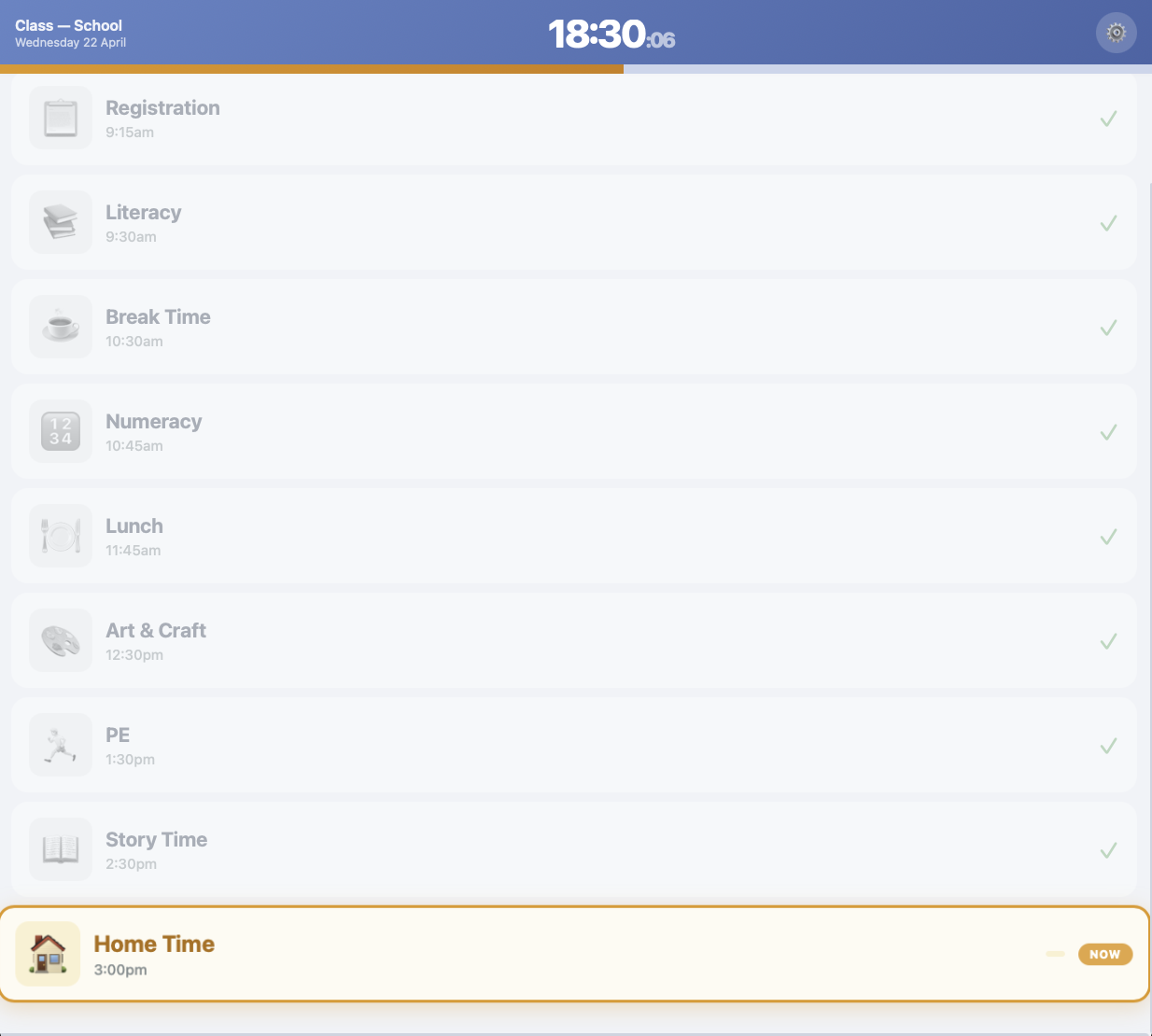
A classroom timetable that moves forward on its own — every learner can see it on their own device, by scanning a QR code.

Built after a Support for Learning teacher in Edinburgh asked for something she could customise for one learner managing the day. No log-in. No app. Works on the network the school already has.

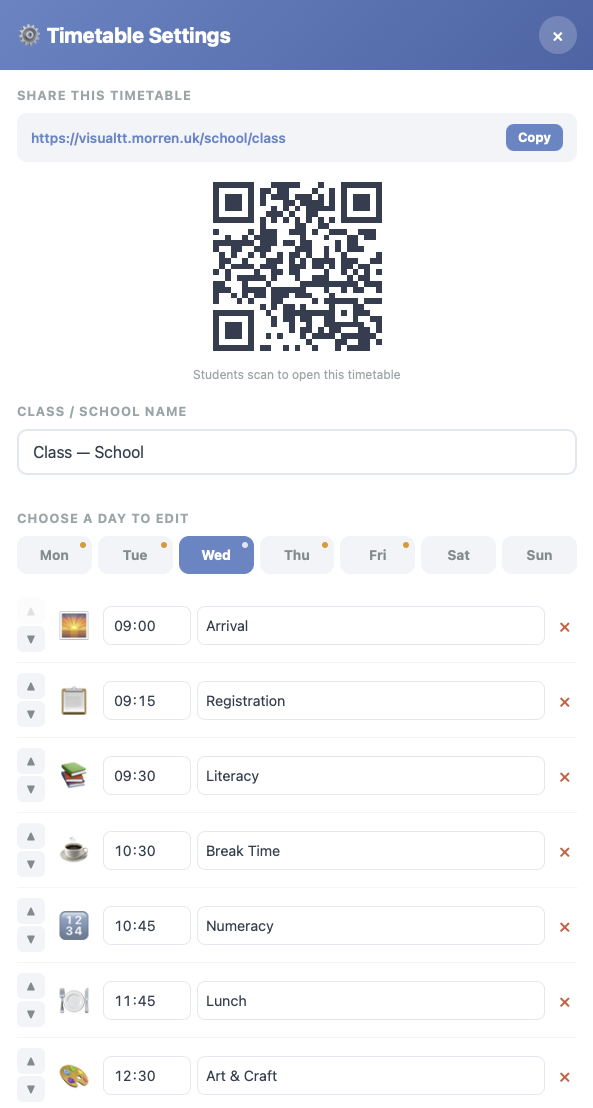
Teachers set the day in about a minute — drag the periods in, add a picture, pick the pace. The class follows along on iPads, a laptop, or the projector. When a period ends, the next one comes up on its own.
Specification
Status
Live since April 2025
Built at
Edinburgh Council
For
Primary & ASN classrooms
Runs on
Any browser, any device
Privacy
No accounts, no cookies
Try it
visualtt.morren.uk
Mirror
visual-tt.mmorren.workers.dev
Visual TT teacher setup screen
Teacher setupShare link & QR code at the top; drag periods in below. A class sets up in under a minute.
Visual TT learner view
Learner viewThe current period is highlighted, the rest grey out as the day moves on. Works on any device with a browser.
№ 02
StoryBuilder
◐ TestFlight
for early-years literacy support
№ 03
SfL Tracker
◎ On request
one file, no server, prints cleanly
Work / SfL Tracker / No. 03
On request

SfL Tracker

A single file that replaces the spreadsheet nobody wanted to open. Prints cleanly. Works offline.

A small, focused tool for Support for Learning co-ordinators to keep track of targets, reviews and conversations across a caseload. Opens in any browser, saves on the teacher’s own laptop, and — when the paperwork asks for it — prints onto a single side of A4 per learner.

No sign-in, no subscription, no server. One file you can email to yourself. When the laptop gets replaced, the file comes with it.
Specification
Status
Issued on request
Built at
Edinburgh Council
For
SfL co-ordinators & teams
Runs on
Any laptop, offline
Privacy
Stays on the teacher’s device
Prints
A4, one side, per learner
Try it
sfl-tracker.morren.uk
Mirror
sfl-tracker.mmorren.workers.dev
SfL Tracker cohort grid with SWST and SWRT scores
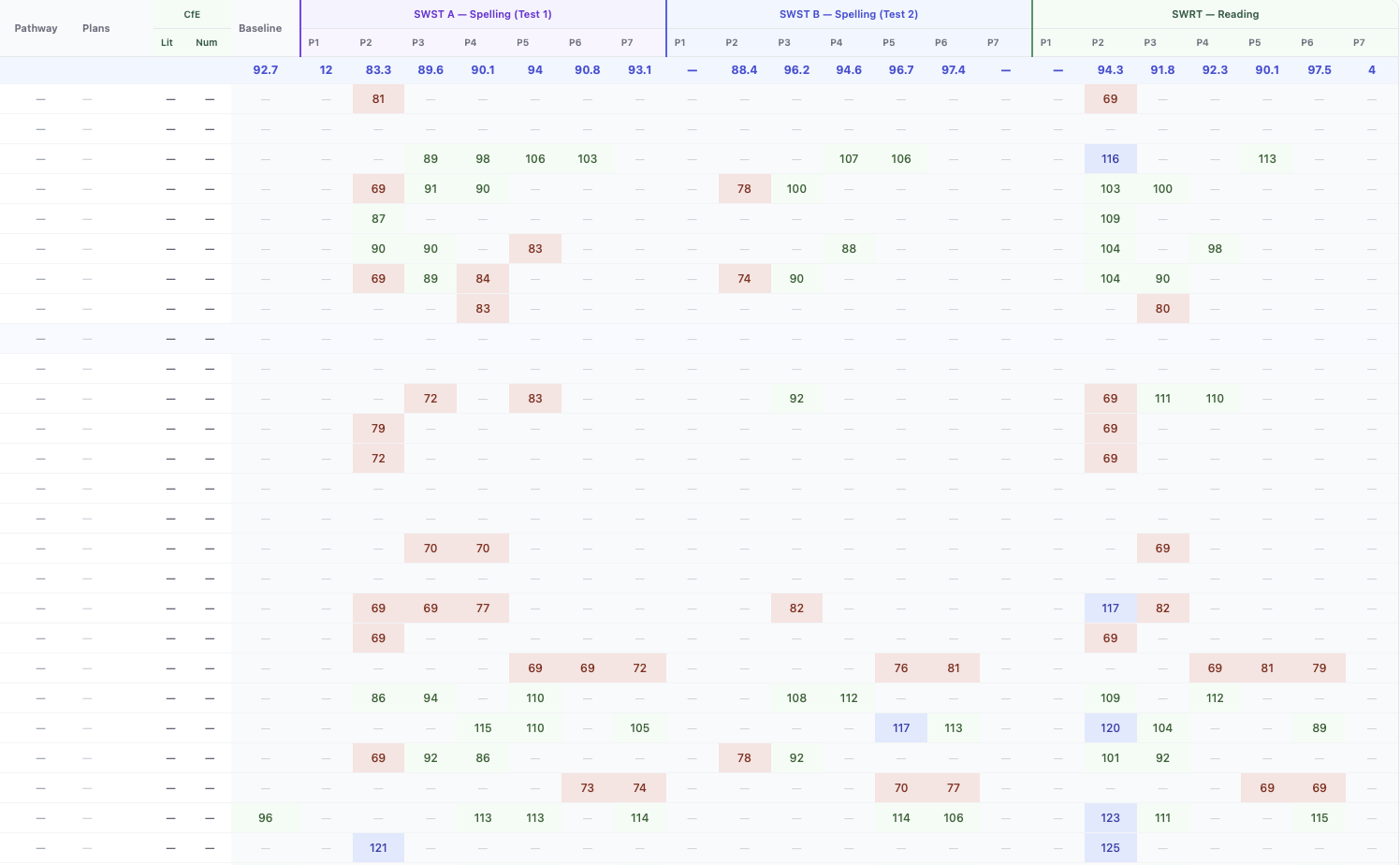
Cohort gridEvery learner’s SWST and SWRT scores in one view. Red flags a score below average; blue, above.
SfL Tracker pupil profile
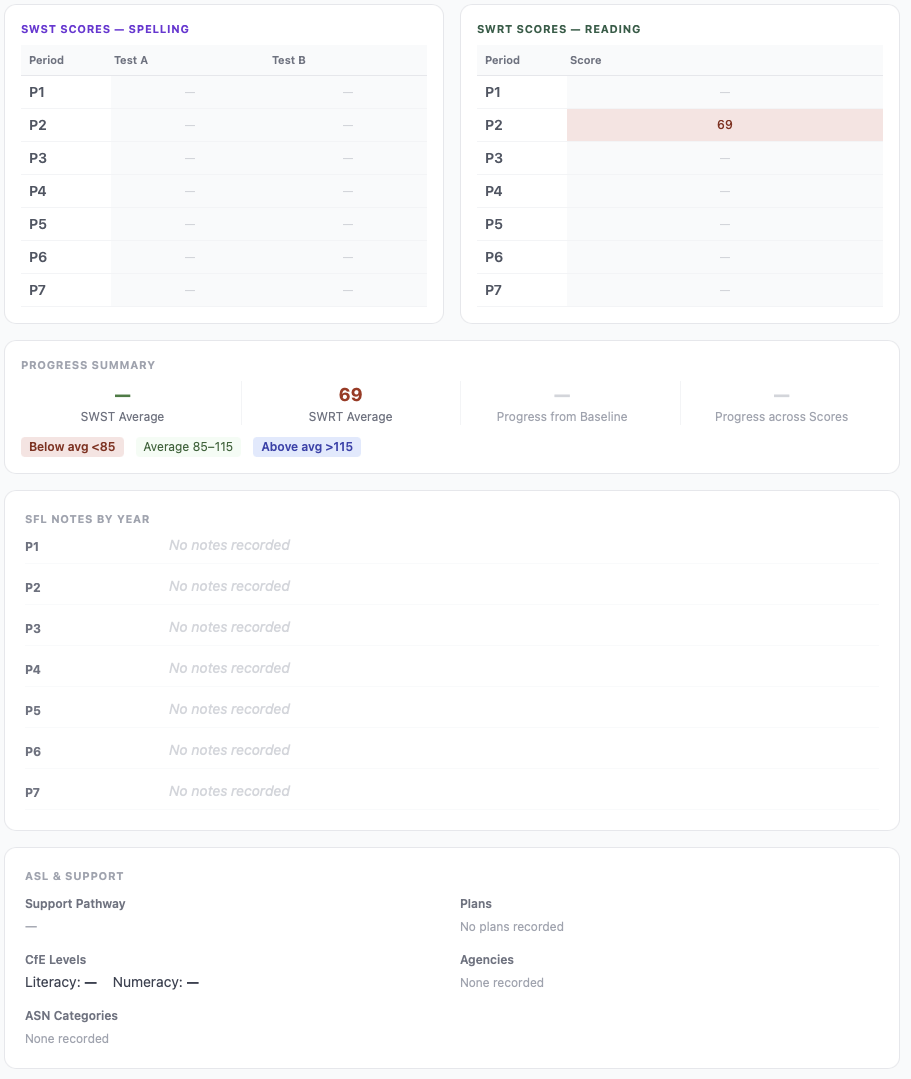
Pupil profileOne learner, all their scores, notes, support pathway and plans. Prints cleanly onto one side of A4.
№ 04
iPad Dashboard
◎ On request
the Jamf export, made readable
Work / iPad Dashboard / No. 04
On request

iPad Dashboard

A Jamf Pro CSV, actually readable. Compliance, battery, devices near end-of-life — on one page a head teacher will actually look at.

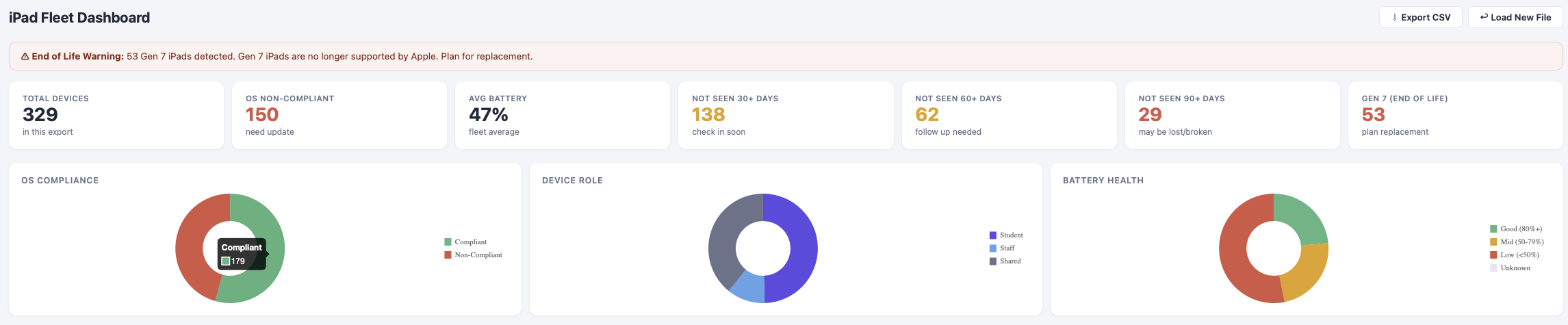
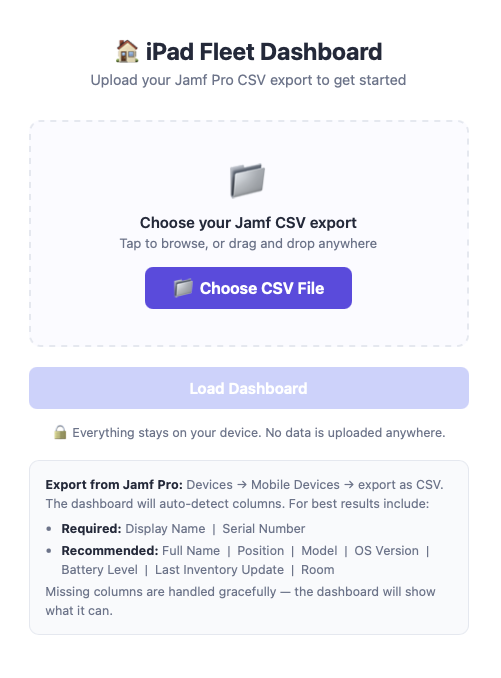
Jamf Pro will give you a long export of every iPad in the estate. This turns that CSV into a dashboard a network lead can send upstairs — total devices, compliance, average battery, check-in ages, and a clear flag for any iPads Apple no longer supports.

Built to be boring. No log-in, no animation, no charts that wobble on load. Drop the CSV in, get the summary out, send the PDF, move on.
Specification
Status
Issued on request
Built at
Tomlinscote & beyond
For
Network leads, senior leaders
Runs on
Any laptop, in the browser
Privacy
Nothing leaves the device
Input
Jamf Pro CSV export
Try it
ipad-dashboard.morren.uk
Mirror
ipad-dashboard-cac.pages.dev
iPad Dashboard overview
Fleet overviewCompliance, battery health, check-in ages, and a clear end-of-life warning for iPads Apple no longer supports.
iPad Dashboard welcome screen
Get startedDrop in the Jamf Pro CSV. Everything stays on the laptop — nothing is uploaded anywhere.
№ 05
LC Task Tracker
◌ Internal
learning-community tasks, without the admin weight
Work / LC Task Tracker / No. 05
Internal · Edinburgh Council

LC Task Tracker

A quiet place for learning-community work — the visits, the coaching, the CLPL logs — without the admin weight.

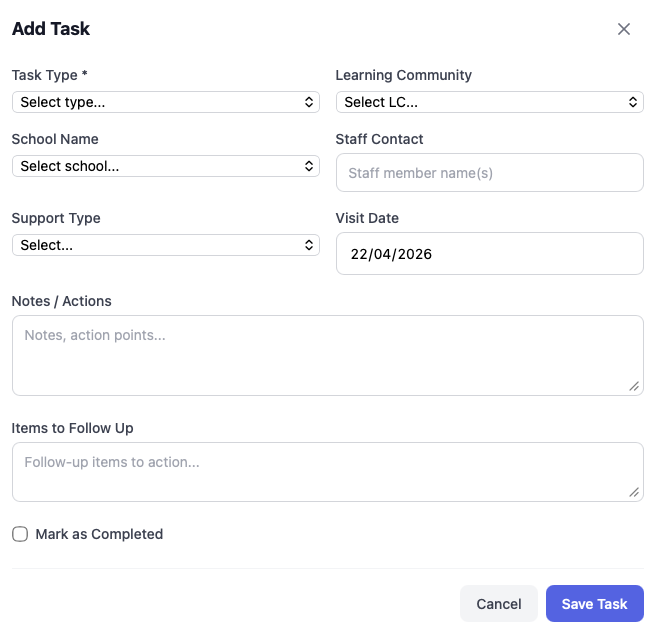
Built for digital-development work with Learning Communities across Edinburgh. School visits, coaching, INSET, DPIA tasks — each one logged against a school and a learning community, with notes, follow-ups, and mileage for the year end.

The design goal was invisibility. Add a task, move on. Export to Excel or OneNote when you need to report; otherwise the tool stays out of the way.

Specification
Status
Internal tool
Built at
City of Edinburgh Council
For
Digital Development Officers
Runs on
Any laptop, in the browser
Privacy
Stays on the device
Exports
Excel, OneNote
Try it
tracker.morren.uk
Mirror
lc-tracker-mmorren.netlify.app
LC Task Tracker dashboard
DashboardOne glance at the year — tasks logged, tasks in progress, mileage and expenses ready for the claim.
LC Task Tracker add task form
Add a taskA task is a school, a learning community, a type, notes and follow-ups. Takes under a minute.
№ 06
Class Points
• Live
two-tap points, live leaderboard on the projector
Work / Class Points / No. 06
Live · 2025

Class Points

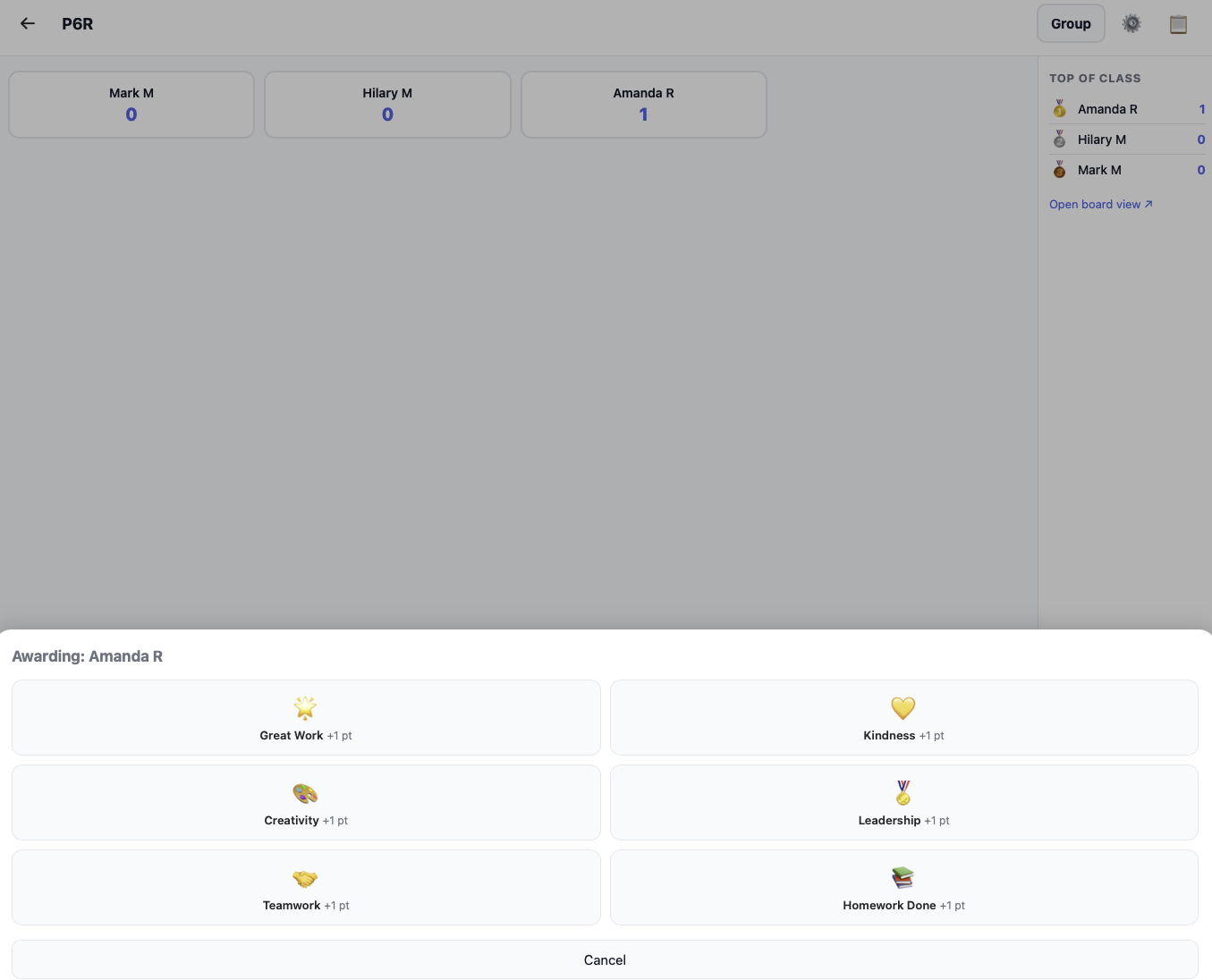
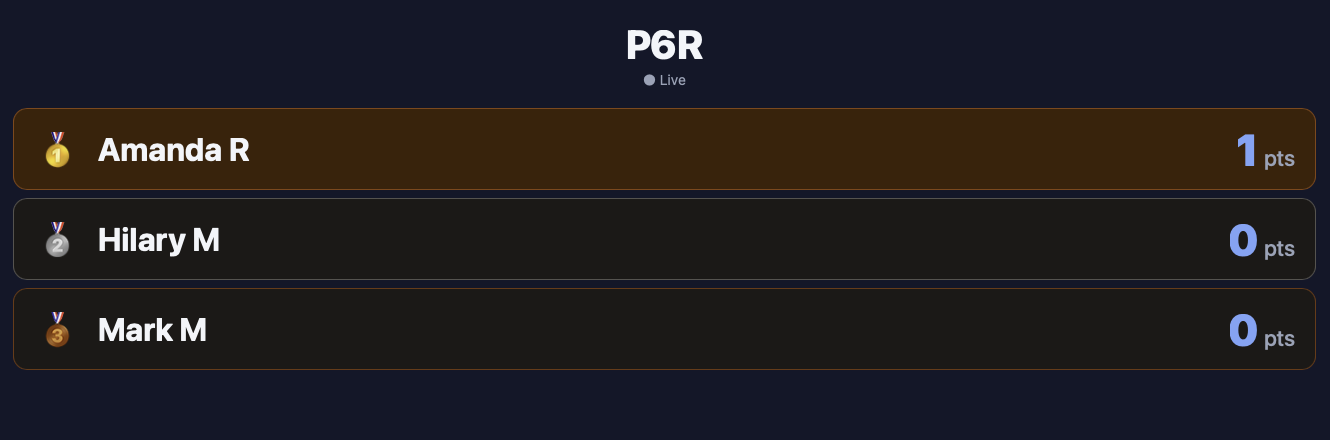
Award a point in two taps. The leaderboard updates instantly — on every device in the room, including the projector.

Built for the moment a teacher wants to recognise good work without stopping the lesson. Pick the pupil, tap the point — that’s it. A separate board view runs on the classroom display and refreshes on its own. No app, no printer, no paper.

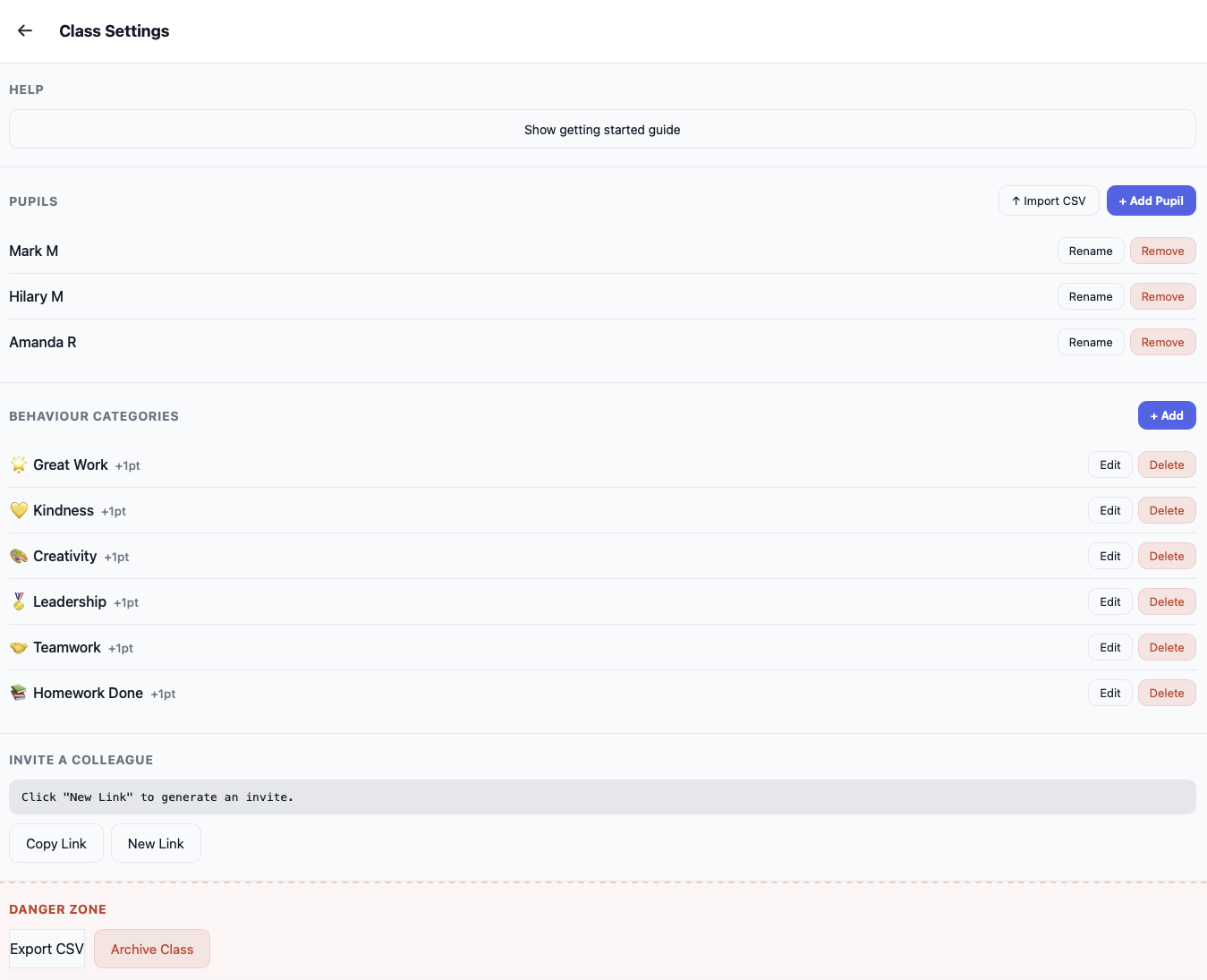
Teachers share a class with a colleague without any fuss. Co-teach support is built in: invite a second teacher, and both can award points from their own device at the same time.
Specification
Status
Live since 2025
For
Class teachers & co-teachers
Runs on
Any browser, any device
Privacy
School data only, no third parties
Export
CSV export of all points data
Try it
points.morren.uk
Mirror
class-points-alu.pages.dev
Class Points getting started screen
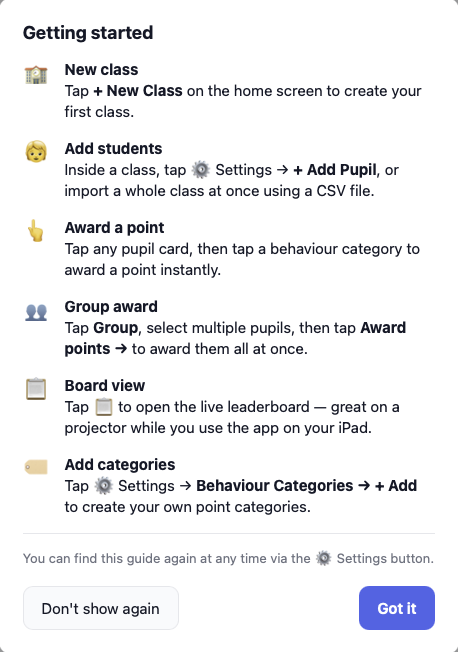
Getting startedSign in, name your class, add your pupils. The whole setup takes under two minutes.
Class Points teacher view
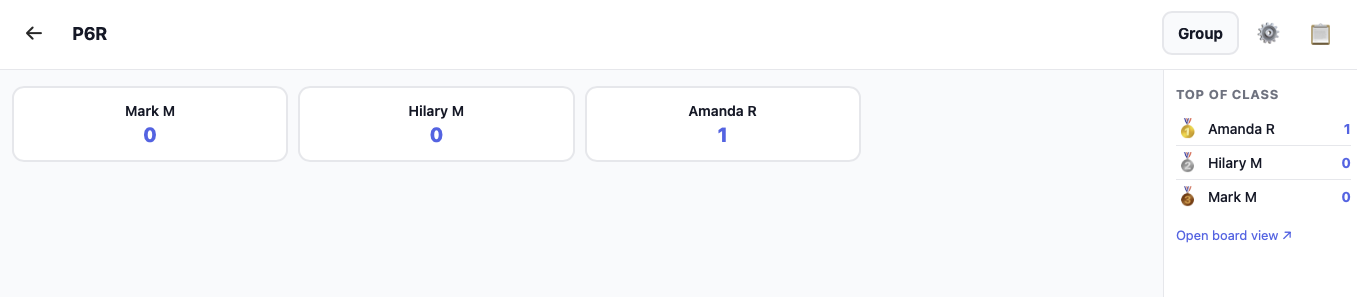
Teacher viewEvery pupil at a glance, with their running total. Tap to award — or tap to take one away.
Class Points awarding a point
Awarding a pointPick the pupil, tap the point. The leaderboard updates on every device in the room instantly.
Class Points classroom board view
Board viewDesigned for the projector. Pupils see exactly where they stand; the display refreshes on its own.
Class Points class settings
Class settingsRename pupils, adjust point values, invite a co-teacher — all in one place.

Thirty years, roughly.

1993 — 2026

— Education, music, early teaching

1993–94
Royal Academy of MusicPostgraduate saxophone · Countess of Munster Award
1996–01
King’s College School, WimbledonHead of Woodwind & Brass
2001–02
Dulwich International College, ThailandDirector of Music
2003–09
Teaching, South LondonClassroom & middle leadership

— Senior leadership, Apple, Edinburgh

2009–15
St Mark’s C of E AcademyVice Principal / Assistant Head
2017–21
Tomlinscote Schoole-Learning Co-ordinator · Apple Distinguished School lead
2019–now
Apple Professional LearningSpecialist · Learning Coach (2024)
2021–23
The Prospect TrustHead of ICLT
2023–now
City of Edinburgh CouncilDigital Development Officer

Get in touch.

If you’re a teacher, a depute, a council, or anyone who thinks a tool here might help — please email me. I answer everything, usually the same evening.

For TestFlight access to StoryBuilder, or private builds of the trackers, a quick line is the fastest way.

[email protected]